Creating Digital Scrapbook Visuals from Memories
A memory rarely exists as one clean photograph. It’s usually a blur of details, the light in the room, the exact shade of a favorite sweater, a moment that never got captured on camera at all because nobody thought to grab a phone in time. Turning that kind of memory into something visual used to mean settling for whatever photos existed. An AI image generator changes that considerably, letting a half-remembered moment become an image even when no camera was there to catch it. Dreamina, running on its newest model Seedream 5.0 Pro, handles this kind of nostalgic, personal work with real sensitivity to mood.

Why memories deserve more than the photos that survived
Most families have gaps in their photo history, the birthday nobody photographed, the ordinary Tuesday afternoon that turned out to matter more in hindsight than anyone realized at the time. A scrapbook built only from surviving photos leaves those moments out entirely. Generating a visual from a described memory fills that gap, giving a feeling or a half-remembered scene somewhere to actually live, even without an original photograph behind it.
What makes a memory translate well into a visual
Some described memories turn into strong images easily. Others come out feeling generic. A few things tend to separate the two:
- Specific sensory details, the light, the season, a particular object in the room
- An honest sense of mood, whether that’s joyful, quiet, or bittersweet
- Enough context about who or what was present in the moment
Vague descriptions like “a happy day” produce vague results. Specific ones, like “the kitchen smelled like cinnamon and the window was fogged from the cold,” give a model something real to build from.
Meet Dreamina’s Seedream 5.0 Pro
Seedream 5.0 Pro handles this kind of emotionally grounded work well because it reasons through the relationships between mood, setting, and subject before generating, rather than defaulting to something generic. That matters when a memory carries a specific feeling that needs to come through in the final image, not just an accurate depiction of a scene. Point selection, lasso tools, and sketch guidance let you refine details afterward, while layer separation makes it possible to adjust lighting or background elements independently. With 2K output holding fine detail and built-in research keeping stylistic choices like vintage color grading feeling authentic rather than dated, it’s a model well suited to recreating the texture of a real memory.
Turning a described memory into a finished scrapbook visual
This is where the memory actually starts to feel visible again. Here’s how it plays out inside Dreamina.
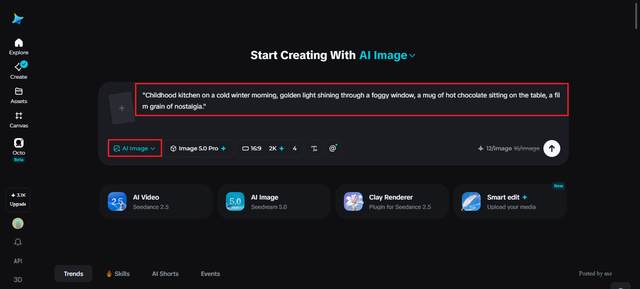
Step 1: Write a text prompt and/or add reference image
Head to Dreamina and describe the memory in as much sensory detail as you can recall, setting, lighting, mood, who or what was there. An old photograph should be uploaded from that period of time for reference purposes.
The following is an example of how the prompt should look like: “Childhood kitchen on a cold winter morning, golden light shining through a foggy window, a mug of hot chocolate sitting on the table, a film grain of nostalgia.”
Step 2: Adjust parameters and generate
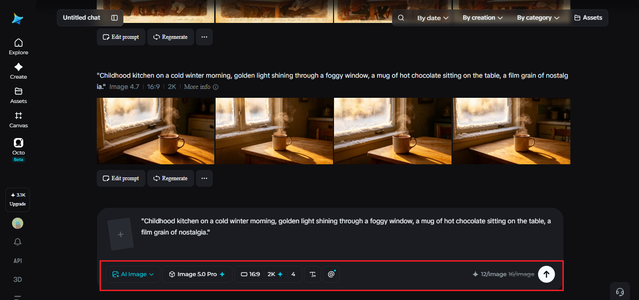
Select Image 5.0 Pro by Seedream 5.0 Pro as your model. Set your aspect ratio and size to match how the scrapbook page will be laid out, then choose resolution, 1K to test whether the mood is landing, 2K once you’re ready for the final version. Click Dreamina’s icon once it’s set, and let it generate.
Step 3: Customize and download
A memory-based image often needs a gentle adjustment before it feels complete. Use inpaint, expand, remove, and retouch to deepen the warmth of the lighting, adjust a detail that doesn’t quite match how the moment is remembered, or soften an element that feels too sharp for the mood. Once it feels right, hit “Download.”

Building a scrapbook that feels like one continuous story
A page-by-page collection works best when every visual shares a consistent emotional tone. A few habits help with that:
- Keep color grading and lighting warmth consistent across every generated image
- Group memories by season or era rather than mixing tones randomly
- Let real photos and generated visuals sit side by side rather than trying to hide which is which
This keeps a scrapbook feeling like a genuine collection of memory rather than a mismatched set of unrelated images.
Mistakes that flatten a memory-based visual
A handful of habits tend to undercut this kind of personal work specifically. Describing a memory too generically leaves out the very details that made it worth remembering in the first place. Over-polishing the final image can strip away the slightly imperfect, lived-in quality that makes a memory feel real rather than staged.

Where this approach is especially meaningful
Turning memories into visuals tends to matter most in personal and reflective contexts. Family scrapbooks and keepsake albums benefit enormously, filling in gaps where photographs never existed. Memorial or tribute pieces follow a similar pattern, giving a specific remembered moment somewhere real to live. Personal journaling projects get genuine value here too, pairing a written memory with a visual that makes it feel a little more permanent.
Wrapping up
A memory was never less real for lacking a photograph. With Dreamina and Seedream 5.0 Pro, that half-remembered moment can become something visible again, carrying the light, the mood, and the small details that made it worth holding onto in the first place.